
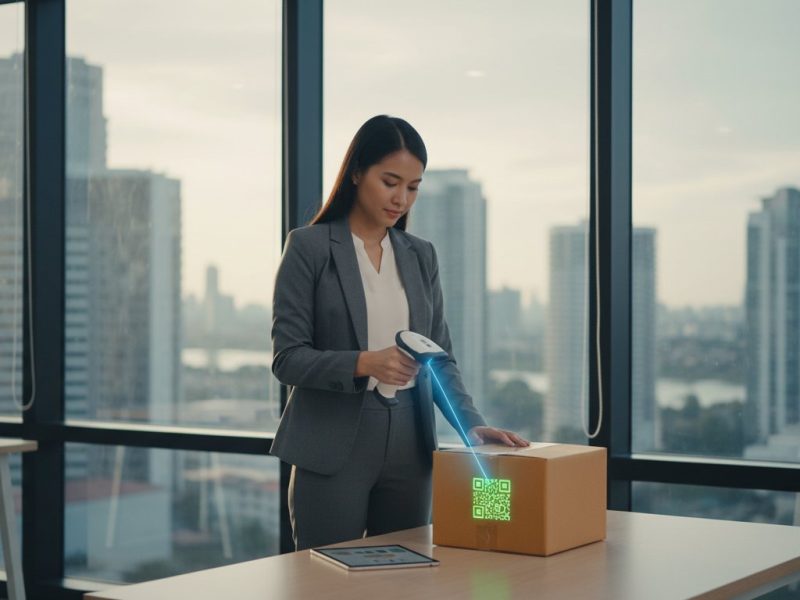
In the fast-paced Philippine market, operational delays are more than an inconvenience-they are a direct threat to your bottom line. From frustratingly slow checkouts caused by inaccurate scans to warehouse inefficiencies stemming from the wrong technology, the choice of a barcode scanner can significantly impact your daily operations and profitability. Yet, navigating the complex world of 1D vs. 2D, laser vs. imager, and ensuring seamless integration with your existing POS system can be a formidable challenge for any business.
This definitive guide is designed to eliminate that uncertainty. Here, you will gain a clear understanding of the different types of barcode scanners and learn how to select the right model for your specific needs, whether in retail, logistics, or manufacturing. We will equip you with the knowledge to make a smart investment in a durable, reliable device and connect with a trusted supplier in the Philippines, ensuring your business operates with enhanced speed, accuracy, and efficiency.
Key Takeaways
- Discover how automating data capture can significantly reduce costly errors and accelerate your core business processes.
- Learn to distinguish between 1D and 2D scanning technology to select a device that meets your inventory’s specific needs.
- Identify the ideal barcode scanner for your sector, with tailored recommendations for retail, logistics, and manufacturing in the Philippines.
- Understand the value of partnering with a specialized local supplier for seamless integration, reliable after-sales support, and long-term ROI.
What is a Barcode Scanner and Why Your Business Needs One
In today’s fast-paced Philippine market, operational efficiency is not just an advantage; it is a necessity. A barcode scanner is a specialized electronic device engineered to capture and read the information contained within a barcode. Its core function is to automate data entry, instantly translating the bars and spaces into digital data that your systems can process. By leveraging robust Barcode reader technology, this device eliminates the slow, error-prone process of manual input, forming the backbone of modern inventory and point-of-sale operations.
For any business managing physical assets, the benefits are immediate and substantial:
- Accelerated Transactions: Drastically reduce customer checkout times in retail and speed up goods receiving in warehouses.
- Enhanced Accuracy: Eliminate costly human errors in data entry, which can lead to inventory discrepancies, incorrect pricing, and shipping mistakes.
- Streamlined Inventory Management: Simplify cycle counts, stock-taking, and asset tracking with rapid, precise data capture.
Dedicated Scanners vs. Smartphone Apps: A Business Perspective
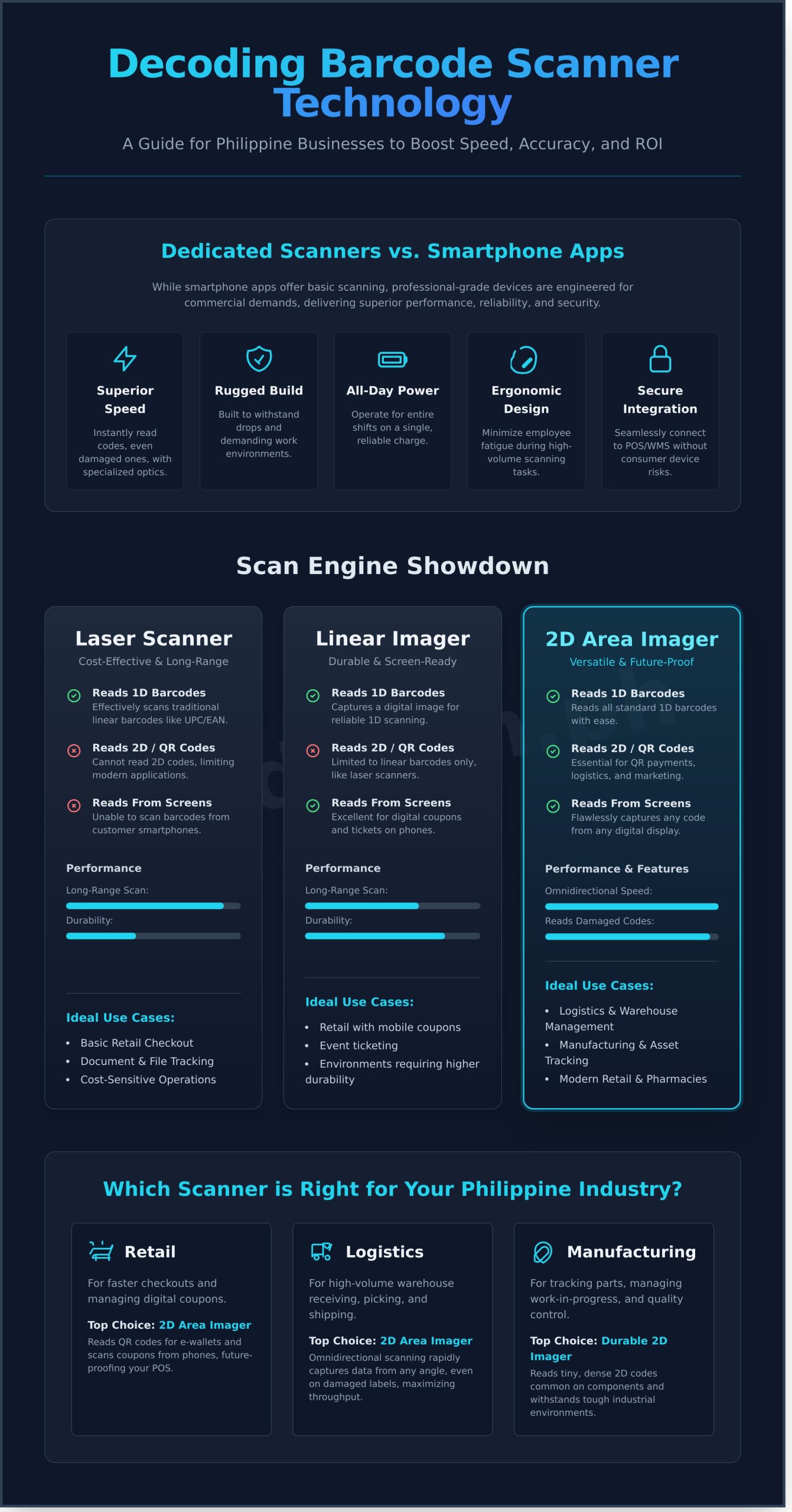
While smartphone apps offer basic scanning, they are not engineered for commercial demands. A professional-grade device offers superior performance through specialized optics that read barcodes instantly, even those that are poorly printed or damaged. Built for demanding environments, these rugged scanners withstand drops and operate for entire shifts on a single charge. Their ergonomic design minimizes employee fatigue during high-volume tasks, while dedicated hardware ensures secure, seamless integration with your existing POS or Warehouse Management System (WMS) without the security vulnerabilities of consumer devices.
The ROI of Investing in the Right Scanner
The return on investment for a professional barcode scanner is both rapid and measurable. Consider the time saved: if manual entry takes 5 seconds per item versus 1 second for a scan, your business saves over an hour of labor for every 1,000 items processed. More importantly, improved accuracy prevents costly mistakes. A single mis-shipped pallet can cost thousands of pesos in logistics and lost sales-an expense a scanner virtually eliminates. This precision empowers your employees with reliable tools, leading to higher job satisfaction and a smoother, faster experience for your customers.
Ultimately, selecting the right scanner is the first step. Integrating it into a cohesive system is what unlocks true operational excellence. This is where a Total Solution Provider becomes a critical partner, ensuring your Identification and Data Capture technology works in perfect sync with your business goals.
Decoding the Technology: The Main Types of Barcode Scanners
Selecting the right barcode scanner for your Philippine enterprise requires understanding the core technologies that drive performance. A scanner is not a one-size-fits-all device; its effectiveness is determined by three key factors: the scan engine that reads the code, the physical form factor designed for a specific environment, and the connectivity that dictates its mobility. Matching these elements to your operational needs ensures optimized data capture, improved efficiency, and a robust return on investment.
By Scan Engine: Laser vs. Linear Imager vs. 2D Area Imager
The scan engine is the heart of any scanner, defining what types of barcodes it can read and how well it performs under various conditions.
- Laser Scanners: These traditional scanners use a red laser diode to read standard 1D barcodes (like UPC/EAN). They are highly cost-effective and excel at long-range scanning, but require the barcode to be relatively well-printed and high-contrast. They are a reliable choice for basic retail and document tracking.
- Linear Imagers: Instead of a laser, these devices capture a digital picture of a 1D barcode. This makes them more durable with no moving parts, and gives them the ability to read codes from digital screens-a crucial feature for scanning coupons or tickets from customer smartphones.
- 2D Area Imagers: The most versatile and future-proof option. An area imager functions like a digital camera, capturing a complete picture to read any code-1D, 2D, and QR codes-from any direction. This omnidirectional capability dramatically speeds up scanning. For businesses in the Philippines utilizing QR codes for digital payments, logistics, or marketing, a 2D imager is essential. While the underlying physics of how barcode scanners work involves complex light reflection and data conversion, the practical benefit of a 2D imager is its unmatched flexibility.
By Form Factor: Handheld, Presentation, and In-Counter
The physical design of a barcode scanner should align with its intended workflow.
- Handheld Scanners: The most common form factor, valued for its versatility. Available in corded and cordless models, it is ideal for everything from retail point-of-sale to inventory management in the stockroom.
- Presentation Scanners: Designed for hands-free operation, these scanners sit on a counter and automatically scan items passed in front of them. They are perfect for fast-paced checkout lanes in convenience stores and pharmacies.
- In-Counter Scanners: For high-volume environments like major supermarkets, these scanners are integrated directly into the checkout counter, providing maximum speed and a seamless POS station.
By Mobility: Corded vs. Cordless Solutions
Connectivity determines a scanner’s range of motion and deployment flexibility.
- Corded Scanners: Tethered to a POS terminal or computer via a USB cable, these devices offer a reliable, continuous power source and a straightforward plug-and-play setup. Their primary limitation is the fixed range of motion, making them best suited for stationary tasks.
- Cordless Scanners: Using Bluetooth or Radio Frequency (RF), cordless scanners provide complete freedom of movement. This is critical for tasks like warehouse inventory counts, checking prices on a large retail floor, or logistics operations where mobility enhances productivity. When selecting a cordless model, always consider the battery life (scans per charge) and the functionality of its charging cradle.
How to Choose the Right Scanner for Your Philippine Industry
Selecting the optimal barcode scanner goes beyond technical specifications; it requires a deep understanding of your operational environment. The ideal device for a bustling supermarket in Cebu is fundamentally different from one used in a Laguna technopark warehouse. Each industry operates under specific pressures and workflows, adhering to Global barcode standards to ensure supply chain integrity. This guide breaks down the key considerations for the most common business sectors in the Philippines, helping you align scanner capabilities with your unique challenges.
For Retail and Point-of-Sale (POS)
In the fast-paced Philippine retail landscape, speed and reliability at the checkout counter are non-negotiable. To minimize queues and enhance customer experience, prioritize scanners built for rapid, first-time reads. We recommend:
- 2D Imagers: Essential for reading QR codes from digital wallets like GCash and Maya, as well as digital coupons displayed on customer smartphones.
- Presentation Scanners: These hands-free devices allow cashiers to quickly pass items over the scanner, improving efficiency and ergonomics during peak hours.
For Warehouse, Logistics, and Manufacturing
Durability is the primary concern in demanding environments like warehouses, ports, and factory floors. A standard device will not withstand the daily regimen of drops, dust, and moisture. Look for a rugged barcode scanner with:
- High IP Ratings: An IP65 or higher rating ensures protection against dust ingress and water jets, crucial for both indoor and outdoor operations.
- Robust Drop Specifications: Models tested to withstand multiple drops from 1.8 meters onto concrete provide a lower total cost of ownership by minimizing repairs.
- Cordless, Long-Range Capability: Empowers workers to scan pallets on high shelving or across large distribution centers without restriction. For complex tasks, consider mobile computers that integrate scanning, data processing, and connectivity into a single, robust device.
For Healthcare and Office Environments
Precision, safety, and discretion are paramount in clinical and corporate settings. In hospitals, scanners must support patient safety protocols and withstand stringent cleaning. In offices, they must streamline administrative tasks without disruption. Key features include:
- Disinfectant-Ready Housings: Specially designed plastics that resist damage from harsh cleaning chemicals are critical for infection control in patient care areas.
- Quiet, Lightweight Scanners: Ideal for patient identification, medication administration, and document management, ensuring accurate data capture without disturbing patients or office colleagues.
Choosing the right scanner is a strategic decision that directly impacts your operational efficiency and accuracy. If your specific requirements are not covered here, the optimal solution may require a more tailored approach. Consult with our experts for a personalized recommendation to ensure your investment delivers maximum performance.
Key Features to Evaluate Before Making a Purchase
Selecting the right hardware is a strategic investment in your operational efficiency. Beyond the initial cost, a barcode scanner must align with your specific workflow, environment, and long-term business goals. To ensure a future-proof purchase, it is crucial to move beyond basic specifications and evaluate the features that directly impact performance, durability, and total cost of ownership. This practical checklist covers the final considerations every Filipino business should assess before committing to a device.
Barcode Symbology: 1D vs. 2D Capability
Understanding the types of barcodes you need to read is fundamental. 1D barcodes, such as UPC and EAN codes, are the traditional linear symbols found on most retail products. 2D barcodes, like QR Codes and Data Matrix, hold significantly more information and are increasingly used for marketing, logistics, and digital payments. A 2D imager can read both 1D and 2D symbologies, making it the most versatile and forward-thinking choice for any modern enterprise.
Durability and Environmental Sealing (IP Rating)
Your work environment dictates the required ruggedness of your scanner. A device’s durability is measured by two key metrics:
- Drop Specification: This indicates how many times a device can be dropped from a specific height onto a hard surface (e.g., concrete) without damage. A warehouse scanner may require a 1.8m drop spec, while an office device may not.
- IP Rating (Ingress Protection): This two-digit number defines protection against solids (first digit) and liquids (second digit). An IP65-rated device, for example, is completely dust-tight and can withstand water jets, making it ideal for industrial or field environments.
Integration with Your Existing Systems
A scanner is only effective if it integrates seamlessly with your software infrastructure. Most modern scanners offer ‘plug-and-play’ functionality via a simple USB connection. However, it is essential to confirm compatibility with your specific systems. Check for support with your Point of Sale (POS), Warehouse Management System (WMS), or Enterprise Resource Planning (ERP) software. For legacy systems, you may need interfaces like RS232 or Keyboard Wedge.
Ultimately, the best barcode scanner is one supported by a reliable local partner. A strong warranty and accessible after-sales support in the Philippines are non-negotiable for minimizing downtime and protecting your investment. For expert guidance on selecting a device tailored to your operational needs, consult with our identification and data capture specialists.
Finding a Trusted Barcode Scanner Supplier in the Philippines
Selecting the right hardware is a critical first step, but the long-term success of your data capture strategy hinges on the partner you choose. While generic online marketplaces offer a wide selection, they lack the specialized expertise required for a truly optimized deployment. Partnering with a dedicated local supplier provides a level of strategic value that a simple transaction cannot match, ensuring your investment delivers sustained performance and reliability.
Why Local Expertise Matters
A specialized supplier in the Philippines offers more than just a product; they provide a partnership grounded in local context. This translates to professional consultation that aligns the perfect device with your specific operational workflow, whether in a bustling Manila warehouse or a regional retail chain. Furthermore, access to on-site support is invaluable for minimizing downtime. Instead of navigating international service centers, you get swift, effective troubleshooting and repairs from technicians who understand the unique challenges within the Philippine business landscape.
What to Look For in a Supplier
When evaluating potential partners, prioritize those who demonstrate a commitment to comprehensive solutions and proven excellence. A premier supplier should offer:
- A Diverse Portfolio: Look for a provider with a robust selection of not just scanners but also complementary technologies like thermal printers, mobile computers, and high-quality consumables from world-class brands like Zebra.
- Official Partnerships: Authorized distributorships guarantee authentic products, proper warranty coverage, and access to the latest technological advancements.
- A Proven Track Record: A history of successful deployments with local businesses is the clearest indicator of reliability. The right partner understands how to integrate a barcode scanner system to solve real-world operational pain points.
At All ID Asia Philippines Inc., we pride ourselves on being more than a vendor; we are a total solution provider for Identification and Data Capture. Our team is dedicated to empowering businesses with robust, cost-effective technology backed by unparalleled local support. Consult with our experts to find your ideal scanning solution.
Secure Your Operational Advantage with the Right Barcode Scanner
Selecting the ideal barcode scanner is a strategic decision that directly impacts your operational efficiency, accuracy, and profitability. As this guide has shown, choosing the right device requires a careful evaluation of your unique industry needs-from the specific barcode types you use to the environmental demands of your workplace. An informed investment considers not just the initial hardware cost, but the long-term value delivered through enhanced productivity and reduced errors, making it a cornerstone of modern business management in the Philippines.
To ensure your investment is sound and future-proof, partner with a specialist. As a Total AIDC Solutions Provider and an authorized distributor of world-class brands like Zebra, AllID Philippines offers more than just products. We deliver comprehensive solutions backed by local technical support and service you can rely on. Let us help you integrate the perfect data capture technology into your workflow. Browse our complete range of barcode scanners or consult with an All ID expert today.
Frequently Asked Questions
What is the typical price range for a business-grade barcode scanner in the Philippines?
In the Philippines, the price for a business-grade barcode scanner can range from approximately ₱3,000 for a basic corded model to over ₱25,000 for a rugged, industrial-grade wireless unit. Factors influencing this cost include the scanner’s technology (laser vs. 2D imager), durability ratings for drops and environmental sealing, and connectivity options. For most retail or light warehouse applications, a reliable device typically falls within the ₱5,000 to ₱15,000 price bracket.
Can a standard barcode scanner read QR codes from a mobile phone screen?
This capability depends on the scanner’s technology. Standard 1D laser scanners cannot read 2D codes like QR codes, especially from a backlit screen. To reliably scan QR codes from mobile phones, you require a 2D imager scanner. These devices use camera-based technology to capture the entire image, making them highly effective for reading codes off digital displays. Always verify that a model is a 2D imager if this functionality is critical for your operations.
How do I connect a new barcode scanner to my computer or POS terminal?
For most modern scanners, connection is a straightforward plug-and-play process. If you have a corded USB model, simply connect the cable to an available USB port on your computer or POS terminal. The system will typically recognize it as a keyboard device automatically. For wireless Bluetooth models, you will need to pair the device by scanning a specific barcode in the user manual and then selecting the scanner from your computer’s Bluetooth settings.
What is the main difference between a barcode scanner and a mobile computer?
The primary difference lies in their functionality. A barcode scanner is an input peripheral; it captures data and sends it directly to a connected host device like a computer or POS terminal. In contrast, a mobile computer is a standalone, all-in-one device with its own operating system, processor, memory, and display. It can run applications, process data locally, and connect to networks independently, in addition to having an integrated scanner.
Why is my barcode scanner not reading codes correctly, and how can I fix it?
Reading failures often stem from a few common issues. First, ensure the scanner’s lens is clean and free of smudges. Second, check the barcode itself for damage, poor print quality, or glare. The scanner may also be configured for the wrong symbology (barcode type). Refer to your user manual to scan the appropriate programming codes to reset the device to factory defaults or to enable the specific barcode type you need to read.
Do I need to install special software to use a barcode scanner?
In most cases, no special software is required. The majority of barcode scanners are designed to function as “keyboard wedge” devices. This means that when a code is scanned, the data is transmitted to your computer exactly as if it were typed on a keyboard, appearing wherever your cursor is active. For advanced configurations or programming specific device parameters, the manufacturer typically provides optional utility software, but it is not necessary for basic scanning operations.