
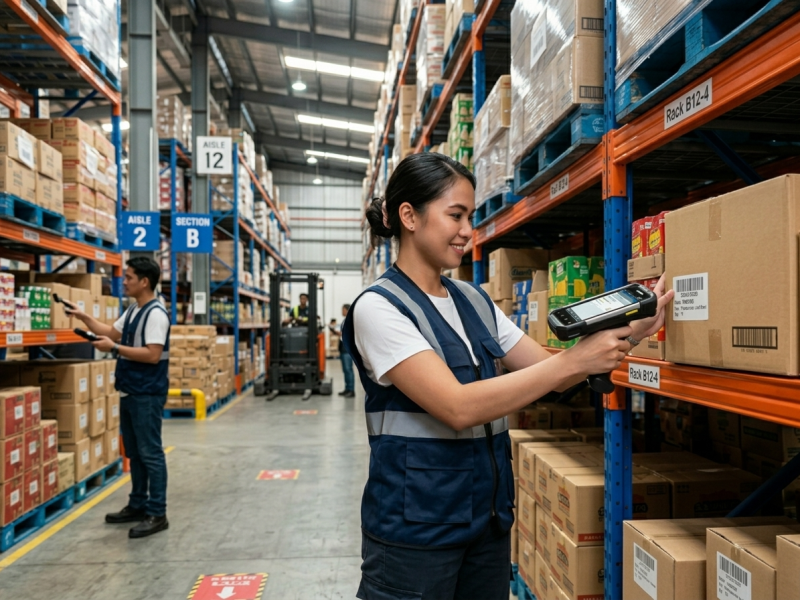
Ask any warehouse supervisor in Manila, Cebu, or Laguna what their biggest operational headache is, and the answer is almost always the same: inventory accuracy. Misplaced stocks, discrepancies between physical count and the system, and slow receiving and dispatch processes are costing Philippine logistics companies thousands of pesos every month — often without them even realizing it.
The fix isn’t more staff or more clipboards. It’s the right technology. A growing number of Philippine warehouses and distribution centers are replacing manual processes with mobile computers — ruggedized Android handheld devices that combine a barcode scanner, a full-sized display, Wi-Fi connectivity, and enterprise apps into a single device workers carry throughout the day.
In this article, we explore how mobile computers transform warehouse operations, what to look for when choosing one, and which Point Mobile models available at All ID Philippines are best suited for the demands of Philippine logistics.
The Problem With Manual Inventory in Philippine Warehouses

Many warehouses in the Philippines — particularly small and medium-sized ones — still rely on paper-based inventory systems. A worker walks the aisles with a clipboard, counts items by hand, and logs everything manually. The data then gets entered into a spreadsheet or WMS (Warehouse Management System) by someone at a desk.
The problems with this approach are well-documented:
- Human transcription errors during manual data entry
- Stock discrepancies that take days or weeks to detect and reconcile
- Slow stocktaking that forces warehouses to halt operations
- No real-time visibility into stock levels for managers or clients
- Lost or misplaced items due to inaccurate location records
For a 3PL (third-party logistics) provider managing multiple client inventories, or a fast-moving FMCG distributor processing hundreds of orders daily, these problems aren’t just inefficiencies — they are direct hits to the bottom line.
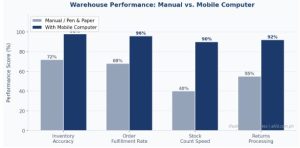
Figure 1: Warehouse performance comparison — mobile computers deliver measurably higher accuracy and throughput across all key operational metrics compared to manual processes. (Illustrative estimates based on industry benchmarks.)
What Is a Mobile Computer and How Does It Work in a Warehouse?
A mobile computer — sometimes called a handheld terminal or industrial PDA — is a purpose-built enterprise device that combines:
- A built-in 1D/2D barcode scanner for instant data capture
- A ruggedized Android operating system that runs WMS, ERP, and logistics apps
- Wi-Fi and optional 4G connectivity for real-time data sync
- A large touchscreen plus physical keypad for fast input even with gloves on
- A long-life battery designed for full 8–12 hour shifts
Workers use mobile computers to scan incoming shipments at the receiving dock, confirm putaway locations in the racking system, pick items against digital pick lists, and conduct cycle counts — all in real time, with data syncing directly to the WMS without any manual re-entry.
5 Key Warehouse Use Cases — and the Right Point Mobile Device for Each
- Inbound Receiving
When a delivery truck arrives, warehouse staff scan carton barcodes and verify quantities against the purchase order in the WMS. Discrepancies are flagged immediately — no waiting hours for a paper count to be reconciled.
| 📱 Point Mobile PM30 — Best for: Receiving / Light Operations
At just 10mm thick and 165g, the Point Mobile PM30 is one of the slimmest and lightest rugged mobile computers on the market. Built on a 2.2GHz Octa-core processor with Android 10/11, IP67 dust/water rating, and an integrated 2D scanner, it handles receiving workflows with ease — while barely feeling like anything in your worker’s hand. |
- Order Picking
Picking is the most labor-intensive warehouse activity. With a mobile computer, pickers receive a digital pick list and are guided through the warehouse bay by bay. Each item is scanned before being placed in the tote, giving 100% scan-verified accuracy before a single order ships.
| 📱 Point Mobile PM75 — Best for: All-Day Picking Shifts
The Point Mobile PM75 is built for pickers who are on their feet all day. Wi-Fi 6 ready with a 5.45-inch HD+ screen, 2.0GHz Qualcomm processor, and MIL-STD-810G drop resistance from 1.5m, it delivers fast, reliable scanning from the first pick to the last order of the shift. The optional extended 5,800mAh battery eliminates mid-shift recharging. |
- Putaway and Location Management
Once items are received, they must be stored in the correct bin or rack location. The mobile computer guides workers through the process — scan the shelf barcode to confirm the location, and the WMS records it instantly. This eliminates the ‘I thought it was on that shelf’ problem that plagues manual warehouses.
| 📱 Point Mobile PM67 — Best for: Systematic Putaway and Verification
The Point Mobile PM67 is a rugged mobile computer armed with a full physical numeric keypad — ideal for putaway workers who need to enter bin codes and confirm locations quickly, even while wearing gloves. It runs Android 11 (Android Enterprise Recommended) and is built for even the most demanding warehouse floor applications. |
- Cycle Counting and Stocktaking
Traditional full stocktakes require a warehouse shutdown for a day or more. With mobile computers and cycle counting methodology, small sections of the warehouse are counted on a rotating basis year-round. Workers scan items in each zone and the WMS automatically reconciles and flags discrepancies. What used to take a full weekend now happens invisibly during normal operations.
| 📱 Point Mobile PM451 — Best for: High-Volume Counting and Dispatch
The Point Mobile PM451 is a powerhouse terminal with a 2.2GHz Octa-core processor, 4GB RAM, 64GB ROM, three keypad options, and an optional gun handle for sustained high-volume scanning. IP65 rated and Android Enterprise Recommended, it is the go-to choice for warehouses where speed and accuracy in counting are non-negotiable. |
- Outbound Dispatch Verification
Before goods leave the warehouse, dispatch staff scan each carton against the shipping manifest, verifying that the right items and quantities are loaded onto the right truck. For operations running multiple outbound routes simultaneously, screen clarity and connectivity are critical.
| 📱 Point Mobile PM85 — Best for: Dispatch / Outdoor and Dock Operations
The Point Mobile PM85 delivers a 5-inch IPS Gorilla Glass display, IP67 water/dust resistance, 1.8m drop resistance to concrete, and a 5,800mAh removable battery — making it the most rugged option in the Point Mobile lineup. With LTE and Wi-Fi support plus dual loud speakers and PTT (Push-to-Talk), it keeps dispatch teams connected even across large open docks. |
The Business Case: Time Saved Per Task
One of the most compelling reasons Philippine warehouses are upgrading to mobile computers is the sheer reduction in time spent on core tasks. Here’s how the numbers compare:
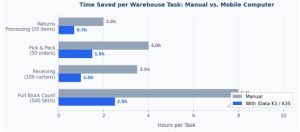
Figure 2: Time per task comparison — mobile computers cut time spent on stock counts, receiving, picking, and returns by 60–70% vs. manual methods. (Illustrative estimates based on industry benchmarks.)
Point Mobile Model Comparison: Which One Is Right for Your Warehouse?
All five Point Mobile models available at All ID Philippines are built for enterprise warehouse use — but each is optimized for a different role. Here’s a side-by-side breakdown:
| Feature | PM30 | PM75 | PM67 | PM451 | PM85 |
|---|---|---|---|---|---|
| Android OS | ✓ | ✓ | ✓ | ✓ | ✓ |
| Built-in 2D Scanner | ✓ | ✓ | ✓ | ✓ | ✓ |
| Physical Keypad | ✗ | ✗ | ✓ | ✓ | ✗ |
| 4G / LTE | Optional | Optional | Optional | Optional | ✓ |
| Screen Size | 4.7″ | 5.45″ | 5.5″ | 4.0″ | 5.0″ |
| Drop Rating | 1.5m | 1.5m | 1.5m | 2.0m | 1.8m |
| IP Rating | IP67 | IP65 | IP65 | IP65 | IP67 |
| Battery | 3,250mAh | Up to 5,800mAh | 4,200mAh | 4,000mAh | 5,800mAh |
| Best Role | Receiving | Picking | Putaway / Verification | Counting / Dispatch | Heavy Dock / Outdoor |
Quick Selector: Match the Right Model to Your Operation
| Operation Type | Volume | Recommended Model | Why It Fits |
|---|---|---|---|
| Small Stockroom / Convenience Distributor | Low–Med | Point Mobile PM30 | Lightest device in the lineup — great for small teams and tight spaces |
| Mid-size Warehouse (Picking & Putaway) | Medium | Point Mobile PM75 | Wi-Fi 6 + large screen handles fast-paced picking operations all day |
| Systematic Location Management | Medium | Point Mobile PM67 | Physical keypad speeds up bin code entry and location confirmation |
| High-Volume Distribution Center | High | Point Mobile PM451 | Optional gun grip + 2m drop rating built for heavy, sustained scanning |
| Outdoor Dock / Port / Multi-Site | Very High | Point Mobile PM85 | IP67, built-in LTE, Gorilla Glass — the toughest option in the range |
What to Look for When Choosing a Warehouse Mobile Computer
- Android OS with enterprise app support — All Point Mobile devices run Android and are Android Enterprise Recommended, ensuring smooth deployment with WMS, ERP, and MDM software.
- 1D and 2D barcode scanning — Warehouses handle everything from legacy 1D product barcodes to QR codes and GS1 Data Matrix on newer goods. Every Point Mobile model handles both.
- Physical keypad vs. touchscreen-only — For gloved workers or high-speed data entry, a physical keypad (PM67, PM451) is faster and more reliable than touchscreen alone.
- Drop and dust resistance (IP65 or better) — All Point Mobile warehouse models carry IP65–IP67 ratings and 1.5–2.0m drop resistance, covering even the most demanding environments.
- All-day battery life — Look for 4,000mAh and above, with an extended or swappable battery option. The PM75 and PM85 support up to 5,800mAh — enough for double-shift operations.
- 7 years of firmware update support — Point Mobile commits to 7 years of Android firmware updates, protecting your investment far beyond typical consumer device lifecycles.
- Local support and warranty — All ID Philippines provides after-sales support and warranty coverage for all Point Mobile devices.
Frequently Asked Questions
Can Point Mobile devices connect to our existing WMS software?
Yes. All Point Mobile devices run Android and are Android Enterprise Recommended, meaning they integrate seamlessly with most enterprise WMS, ERP, and logistics apps — including SAP, Oracle, and custom-built systems. Your IT team can deploy apps via MDM, and Point Mobile’s own EmKit suite provides additional device management tools out of the box.
How long do Point Mobile devices last in a warehouse environment?
Point Mobile devices are engineered for multi-year enterprise deployment, with IP65–IP67 ratings, 1.5–2.0m drop resistance, and 7 years of Android firmware update support. In typical warehouse use, operators can expect 3–5 years of reliable service — significantly longer than any consumer smartphone.
Which Point Mobile model is best for a first-time warehouse deployment?
For most small to mid-size Philippine warehouses deploying mobile computers for the first time, the Point Mobile PM75 is the most versatile starting point. It balances a large, daylight-readable screen, Wi-Fi 6 connectivity, ruggedness, and all-day battery life — covering receiving, picking, and cycle counting in a single device. As your operation grows, you can add the Point Mobile PM451 for dedicated dispatch and heavy-volume stations.
For Philippine warehouses still relying on clipboards and spreadsheets, upgrading to mobile computers is one of the highest-ROI technology decisions you can make. The gains in inventory accuracy, operational speed, and real-time visibility are immediate — and the devices pay for themselves quickly through reduced errors and reclaimed labor hours.
Whether you need the featherlight Point Mobile PM30 for a small receiving team, the all-day workhorse Point Mobile PM75 for a busy picking floor, the keypad-equipped Point Mobile PM67 for systematic putaway, the heavy-duty Point Mobile PM451 for high-volume counting, or the ultra-rugged Point Mobile PM85 for outdoor dock operations — All ID Philippines has you covered.
Upgrade your warehouse operations with Point Mobile. Explore the full lineup at All ID Philippines — with expert advice, local support, and fast delivery across the Philippines. Shop Point Mobile Devices at allid.com.ph.
