
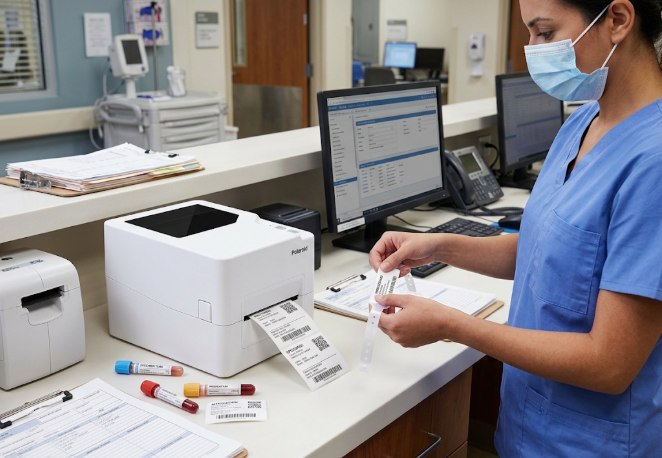
In a hospital, clinic, or diagnostic laboratory, a label is rarely just a label. It identifies a specimen, confirms a patient’s identity, or tells a nurse exactly which medication is in hand. When that label fades, smears, or falls off, the consequences go well beyond a reprint.
This article looks at how the P426T, a compact thermal transfer label printer, can support labeling needs across a healthcare facility, from the laboratory bench to the pharmacy counter and the patient bedside.
Why Label Durability Matters in Healthcare
Healthcare labels go through more handling than almost any other label type. A specimen label may sit in a refrigerator, get wiped with alcohol, and pass through several hands before it reaches the lab technician who reads it. Common problems include:
- Direct thermal labels that fade after contact with alcohol-based disinfectants or prolonged cold storage.
- Barcodes that become unreadable after handling, which slows down specimen tracking and results in delays.
- Handwritten labels that increase the risk of misidentification during a busy shift.
- Multiple departments (laboratory, pharmacy, nursing station, records) each needing their own reliable label output.
This is where the P426T can help. Because it supports thermal transfer printing with a resin or wax-resin ribbon, in addition to direct thermal, it can produce labels built for the handling healthcare environments require.
Meet the P426T: A Dual-Mode Thermal Transfer Label Printer
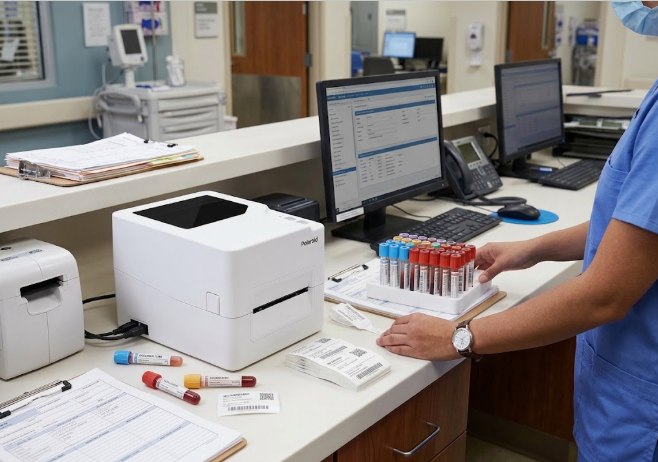
The P426T is a compact desktop label printer that prints using both thermal transfer and direct thermal methods. Its 108 mm maximum print width and support for media from 20 mm to 118 mm wide make it suitable for the range of small, precise labels healthcare settings typically use, from specimen tube labels to larger patient chart or pharmacy labels.
| Specification | Detail |
|---|---|
| Printing method | Thermal transfer and direct thermal |
| Resolution | 203 dpi |
| Maximum print speed | 6 ips (152.4 mm per second) |
| Maximum print width | 108 mm |
| Media types | Continuous, die-cut, black mark, fan-fold, notched |
| Media width | 20 mm to 118 mm |
| Ribbon types | Wax, wax/resin, resin |
| Connectivity | USB, Ethernet, Bluetooth, WiFi (varies by operating system) |
| Label design software | BarTender Ultralite |
| Weight | 2.32 kg, excluding media |
| Operating temperature | 5°C to 40°C |
Table 1. Key specifications of the P426T. Source: All ID Philippines product page.
Features That Matter in a Healthcare Setting
Thermal transfer for labels that need to last
Direct thermal printing works well for short-life labels, but the image can fade with heat, light, or repeated handling. The P426T supports thermal transfer with wax, wax/resin, or resin ribbon, which produces sharper, more abrasion- and smudge-resistant output. That matters for specimen labels that travel between departments or sit in storage before they are processed.
Precision at 203 dpi
Healthcare labels often carry small text, patient identifiers, and dense barcodes in a limited space. At 203 dpi, the P426T can render these details clearly enough to scan reliably at the point of care.
Flexible connectivity for different stations
A hospital or clinic rarely runs on one type of device. The P426T connects over USB, Ethernet, Bluetooth, or WiFi, which lets it fit into a shared laboratory network, a standalone nursing station, or a pharmacy counter without changing hardware.
| Device | Available connections | Typical station |
|---|---|---|
| Windows | USB, Ethernet, Bluetooth, WiFi | Laboratory information system (LIS) workstation |
| macOS | USB, WiFi | Admin or records desk |
| iOS and Android | Bluetooth, WiFi | Mobile printing at the bedside or ward round |
Table 2. Connectivity options of the P426T by device type.
A compact footprint for shared spaces
At 2.32 kg and with a small desktop footprint, the P426T fits into the limited counter space typical of a nursing station, specimen collection area, or small laboratory, without requiring a dedicated printing room.
How Much Time Can a Lab or Nursing Station Save?
Turnaround time matters when specimens or patient wristbands are waiting to be labeled. The chart below shows the theoretical time needed to print different batch sizes of a 2 inch healthcare label, a common size for specimen tubes and patient ID labels, at the maximum 6 ips speed of the P426T, compared with a reference printer running at 3 ips.
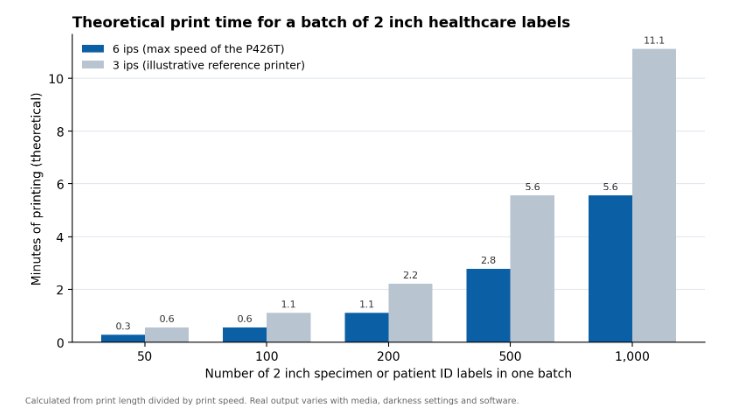
Chart 1. Theoretical print time for a batch of 2 inch specimen or patient ID labels at 6 ips (the maximum speed of the P426T) versus an illustrative 3 ips printer. Calculated from label length divided by print speed.
For a batch of 500 labels, a common volume during a busy shift or a mass screening event, the P426T needs about three minutes at top speed, against roughly six minutes for the 3 ips reference printer. Treat these figures as a planning guide, since actual output will vary with the label size, software, and print settings used.
Where the P426T Fits in a Healthcare Facility
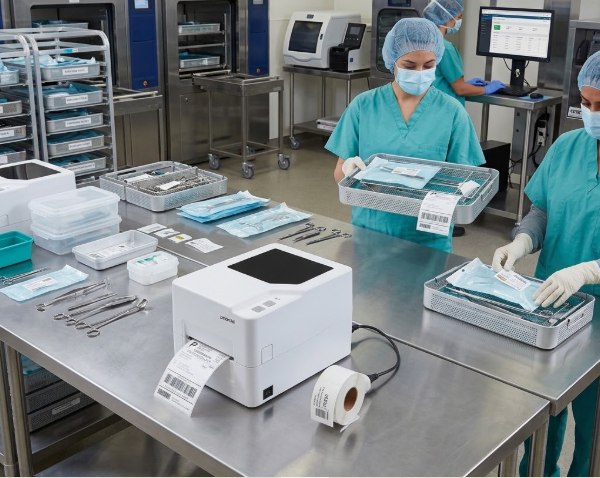
Labeling needs differ across departments. The P426T can support several of them from a single, shared print standard:
| Label type | How it helps a healthcare facility | ||||||||||||||||||||||||||||||||||||||||||||||
|---|---|---|---|---|---|---|---|---|---|---|---|---|---|---|---|---|---|---|---|---|---|---|---|---|---|---|---|---|---|---|---|---|---|---|---|---|---|---|---|---|---|---|---|---|---|---|---|
| Specimen labels | Print clear, durable barcodes for blood, urine, or tissue samples that stay readable through handling and storage. | ||||||||||||||||||||||||||||||||||||||||||||||
| Asset tags | Identify shared equipment such as infusion pumps, monitors, and mobile carts. |
Table 3. Common labeling jobs in a healthcare facility, based on the applications listed for the P426T.
Thermal Transfer or Direct Thermal? A Simple Guide for Healthcare Labels
Both methods use heat, but they behave differently under the conditions healthcare labels face. Here is how they compare:
| Factor | Direct thermal | Thermal transfer |
|---|---|---|
| Ribbon | Not needed | Needed (wax, wax/resin, or resin) |
| Resistance to fading | Lower, can fade with heat, light, and alcohol wiping | Higher, more resistant to smudging and fading |
| Best for | Short-life labels such as visitor passes or temporary tags | Specimen, patient ID, medication, and long-storage labels |
| Running cost | Lower, since there is no ribbon to buy | Slightly higher, because of ribbon |
Table 4. Direct thermal versus thermal transfer printing for healthcare labeling.
Because the P426T supports both methods, a facility can use direct thermal for short-life labels and switch to thermal transfer for anything that needs to stay legible for days, weeks, or longer, all from the same printer.
Quick Checklist Before You Set Up Your Label Printer
- Confirm your label size. Most specimen and patient ID labels fit comfortably within the 108 mm print width and 20 to 118 mm media width of the P426T.
- Choose the right ribbon. Resin or wax-resin ribbon suits labels that need to resist smudging or alcohol wipes. Browse the label printer ribbon range to match your needs.
- Pick your label stock. Select die-cut or continuous rolls sized for your specimen tubes or wristbands from the thermal labels collection.
- Plan your connection. Use Ethernet for a shared laboratory network, or Bluetooth and WiFi for mobile printing at the bedside.
- Set up your templates. The P426T works with BarTender Ultralite, and you can explore BarTender label software if your facility needs more advanced label design or LIS integration.
- Check your workspace. The recommended operating temperature is 5°C to 40°C, suitable for most laboratory and ward environments.
Frequently Asked Questions
Can the P426T print specimen labels for a laboratory?
Yes. Its 203 dpi resolution and support for thermal transfer printing make it suitable for the small, dense barcodes typically used on specimen tubes and containers.
Does the P426T need a ribbon for every label?
Only for thermal transfer printing. If a label does not need long-term durability, the P426T can also print using direct thermal, which does not require a ribbon.
Can the P426T be used for patient wristbands?
Yes. With the correct wristband media and ribbon, the P426T can print clear, durable patient identification labels.
What software works with the P426T?
The P426T supports BarTender Ultralite for label design, and drivers are available for Windows, macOS, Linux, and Seagull.
Where can I buy the P426T in the Philippines?
You can get the P426T directly from All ID Philippines, along with compatible labels, ribbons, and after-sales support.
Ready to Improve Labeling in Your Facility?
A dependable label printer keeps specimens traceable, patients correctly identified, and medications properly labeled. The P426T brings thermal transfer durability, precise 203 dpi output, and flexible connectivity to a compact printer suited for laboratories, nursing stations, and pharmacy counters alike.
Visit allid.com.ph to view the full specifications, download the brochure, or send an enquiry. You can also browse more desktop label printers and the complete label printer range, or contact the All ID Philippines team for a demo or a quote.
